Send files from Android to a PC over Wi-Fi
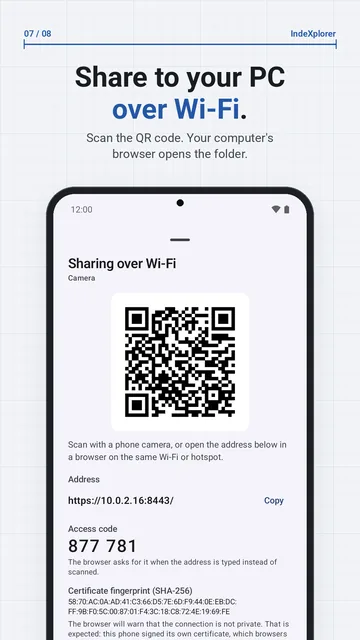
IndeXplorer shares a folder from your phone to any computer's web browser over Wi-Fi. Open the folder, choose Share this folder over Wi-Fi, then scan the QR code or type the address shown. The browser lists the folder, and you download single files or the whole folder as a zip. No cable or computer app is needed.
Step by step
- Connect the phone and the computer to the same Wi-Fi network, or connect the computer to the phone's hotspot.
- In IndeXplorer, open the folder and choose Share this folder over Wi-Fi from the pane's menu. To share selected items instead, choose Share on LAN in the selection menu.
- Scan the QR code with another phone's camera, or on the computer type the address from the sheet into the browser. A typed address asks for the 6-digit access code shown on the phone.
- The browser warns that the connection is not private. Check that the certificate fingerprint in the browser matches the one in the app, then continue.
- Download single files, or the whole folder as a zip. Tap Stop sharing on the phone when you are done.
Send files from the PC to the phone
Turn on Allow uploads in the share sheet, and the browser can add files to the shared folder. Uploads are off until you turn them on and need one shared folder, not a selection of items. A file whose name already exists is kept as a copy, and an upload is renamed into place only when it has fully arrived.
How the share is protected
The share uses HTTPS with a certificate the phone makes itself, so the browser shows a warning; the app shows the certificate fingerprint to compare. A typed address needs a 6-digit access code, which locks for 5 minutes after 5 wrong tries. The QR code carries a session token (valid until the share stops) instead.
The phone's web server listens only on a private address of its Wi-Fi or hotspot connection, never on mobile data. It also stops when you tap Stop sharing or when the phone leaves the network. Plain HTTP is optional, for browsers that can't accept the phone's certificate, and unencrypted.
Limits
- Same Wi-Fi or the phone's hotspot only, never mobile data. If the phone has neither, the share doesn't start.
- One share at a time.
- The browser warns about the phone's self-signed certificate every time; compare the fingerprint before you continue.
- In HTTP mode, as the app warns: "Traffic is not encrypted. Anyone on this network can see the files you download and the access code. Use HTTP only on a network you trust."
- The share stops after 15 minutes without requests (a running download counts as activity), or when the phone leaves the network. Start it again from the folder.
- A typed address needs the 6-digit access code; the QR link doesn't.
- Uploads need a single shared folder and are off until you allow them.
More detail: How it works: Share over Wi-Fi and Is the Wi-Fi share safe on a shared network?
Get IndeXplorer
Free. No ads, no analytics, no account.