
Atrium smoke control and stair pressurization calculator
An offline calculation aid for Android that shows every step and the published equation behind it, so you can follow the hand method. Results must be reviewed by a qualified engineer.

For Android phones. Free: no account, no ads, no in-app purchases.
What Smoke Control Toolkit is
Smoke Control Toolkit is a free Android calculation aid by Sonicon Software for fire-safety and building-services engineers. It covers atrium smoke control and stairwell pressurization in SI units, shows every step with its published equation, and works offline. Results must be reviewed by a qualified engineer.
Two calculators
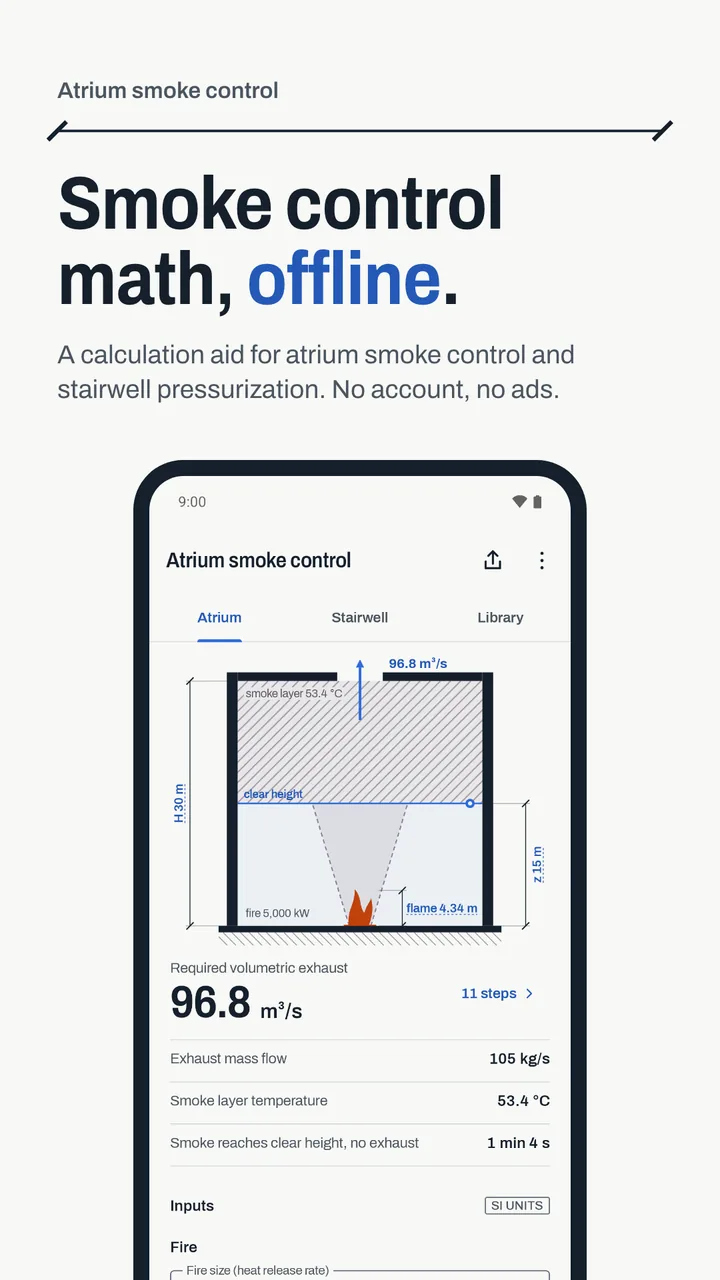
Smoke Control Toolkit has two calculators. Atrium smoke control gives the plume mass flow at your design clear height, the smoke layer temperature and density, and the required exhaust, plus a no-exhaust smoke-filling estimate. Stairwell pressurization totals your leakage paths, gives the supply airflow at your design pressure difference, and checks door-opening velocity and force.
-
Inputs
Atrium smoke control
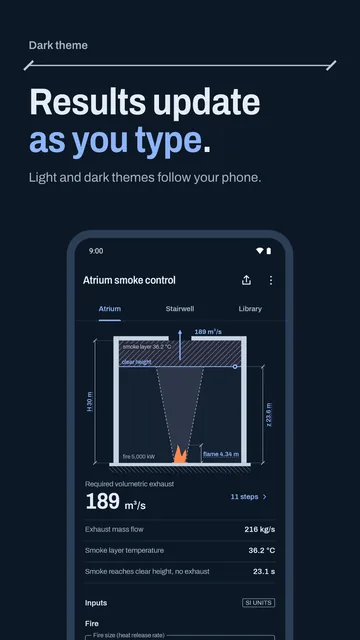
Fire size, convective fraction, ceiling height, floor area, design clear height and ambient air. Convective heat, mean flame height, plume regime and A/H² update as you type.
VerdictRequired volumetric exhaust, with the exhaust mass flow, smoke layer temperature and the time for smoke to reach your clear height with no exhaust.
-
Inputs
Stairwell pressurization
Closed doors, stairwell, exterior and elevator shaft walls, floors and other paths. Wall and floor paths can use the typical ratios from NFPA 92 Table A.4.4.4.3 or your own.
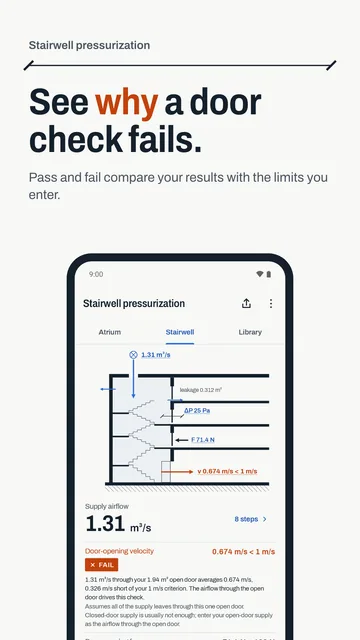
VerdictSupply airflow at your design pressure difference, with door-opening velocity and door-opening force checked against the criterion and limit you enter.
A live section of your building
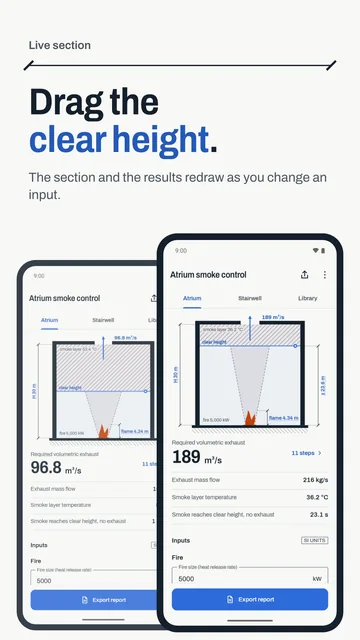
Each calculator opens with a section drawing of the space: the atrium with its fire, plume, smoke layer and exhaust, or the stair core with its doors, supply air and door checks. The drawing redraws as you type. Drag the clear-height line to change it, or tap a blue dimension to edit that input.
A failing door check turns its part of the drawing orange, and every figure on the drawing is also listed in the results below it.
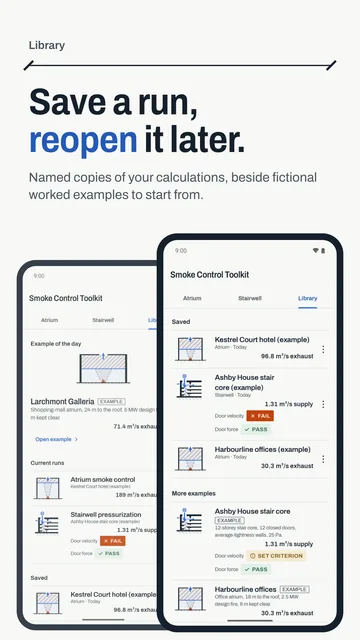
Save runs and start from examples
The Library is where the app opens. It lists your current atrium and stair runs, the runs you saved by name, and five fictional worked examples marked EXAMPLE, with one featured each day. Saving keeps a named copy that stays as it is while you keep editing; opening a run or an example loads it into its calculator.
Saved runs can be renamed, duplicated or deleted, with Undo after a delete. Each row shows its result, worked out again from the saved inputs.
Every result, every step
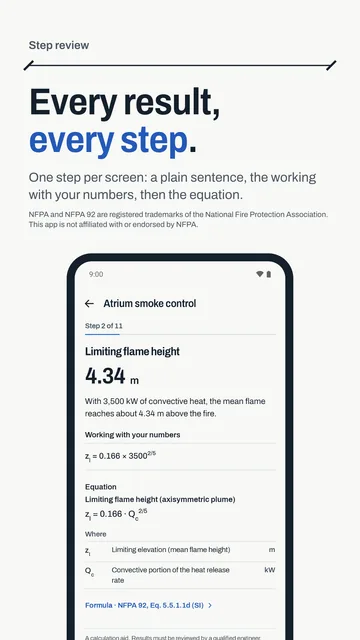
Each result is a list of steps. A step gives a plain sentence built from your inputs, the working with your numbers substituted, and the value. Each step links to a formula reference that explains every symbol and points to the input it comes from, so a reviewer can check the hand method line by line.
You can also review the steps one per screen, with Previous and Next.
56.69 m³/s
Required volumetric exhaust
- Exhaust mass flow
- 56.34 kg/s
- Smoke layer temperature
- 82.13 °C
- Smoke reaches clear height, no exhaust
- 70.1 s
Pass and fail against your own limits
The stair checks compare door-opening velocity and door-opening force with the criterion and limit you enter. The minimum velocity starts as a placeholder, so the app shows SET CRITERION instead of a verdict until you confirm your own. Pass and fail compare your values with your limits; they are not a compliance determination.
1.116 m³/s
Supply airflow at the design pressure difference
- Door-opening velocity
- 0.576 m/s Set criterion
- Door-opening force
- 71.44 N of 133 N Pass
Hand it over as a PDF or CSV
Save or share the current calculation as an A4 PDF report or a UTF-8 CSV file, with your project name, inputs, results and every step. Saving writes the file to a folder you pick; sharing hands it to the app you choose. Every report carries the calculation-aid line and the NFPA trademark line.
- Desk and site: light and dark themes follow your phone, with large touch targets.
- Words, not only colours: PASS, FAIL and SET CRITERION are each written out.
- SI units throughout: kW, m, m², Pa, kg/s and m³/s.
- Your work comes back: the app restores each calculator's inputs when you open it, and keeps the runs you save in the Library.
Check before you rely on it
Smoke Control Toolkit is a calculation aid. It uses published NFPA 92 and Handbook of Smoke Control Engineering equations in SI form, with equation numbers as commonly cited, so check them against the edition your project uses. It covers only the axisymmetric plume from a steady fire, and it models no stack effect or wind.
Keep Ks at 1.0 when you size the exhaust: the app accepts a lower value without a warning, and a lower value gives a smaller exhaust. Read every input and limit and the terms for this app.
What happens to your data
Smoke Control Toolkit has no internet permission, account, ads or analytics, and we collect nothing from it. Your inputs, project name and saved runs are kept in the app, and Android may copy them to your Google account backup and to a new phone. Exports go only where you save or share them. Read the full privacy policy.
Screens from the app
From the same publisher
Critical Velocity Calculator, a sibling Sonicon tool for tunnel critical velocity and required airflow.
Get Smoke Control Toolkit