How Sharp works
Sharp reads one English command, picks the matching group of actions, and asks a small model on your phone which action fits and with what values. Low-risk actions can run straight away when it is sure. Everything else, and every message, call, email, event or ride, waits on a card you check and confirm.
From command to action
You type or speak
Up to 500 characters of English. Speech is turned into text on the phone by Whistle, the built-in speech model.
Sharp narrows it to a group
Time, People, Device, Apps or Create.
The router picks the action
Needle 3, the built-in router model, chooses one action in that group and fills in its values, such as a time or a contact.
Values are checked against your words
A time or name you didn’t say stays empty for you to fill in. Sharp doesn’t guess.
Act, card, or “I’m not sure”
A low-risk action can run when Sharp is sure. Otherwise you get a card. If nothing fits well enough, Sharp says “I’m not sure what to do”, suggests the closest actions and keeps your words to edit. “Why this?” on a card says which group matched and which values came from your words.
The 20 actions
Every command becomes one of these 20 actions. Messages, emails, calls, calendar events and rides always show a card first, and so do alarms and timers you set. The rest can run straight away when Sharp is sure of the command. Turn on Always confirm in Settings to put every action on a card.
| Group | Action | What you get | Card |
|---|---|---|---|
| Time | Calendar event | An event in your calendar, by default 60 minutes long with a 10-minute reminder. With calendar permission it is added directly and can be undone; without it, the Calendar app opens filled in and you save it there. A person you name goes in the title; no invitation is sent. | Always shows a card |
| Time | Alarm | An alarm in your clock app, with an optional label and repeat days. | Always shows a card |
| Time | Timer | A timer in your clock app, with an optional label. | Always shows a card |
| Time | Show alarms | Your clock app’s alarm list. | Can run straight away |
| People | Text message | Your messaging app opens on a new message to the contact, with the text filled in. You tap Send. | Always shows a card |
| People | Chat message | WhatsApp opens on the contact’s chat with the text typed in. Telegram and Signal get the text through Android sharing, and you pick the chat. You tap Send. | Always shows a card |
| People | Your mail app opens with the recipient, subject and text. You tap Send. | Always shows a card | |
| People | Call | With phone permission, the call is placed after you confirm; without it, the dialer opens with the number. | Always shows a card |
| People | Open contact | The contact’s card in your contacts app. | Can run straight away |
| Device | Flashlight | The torch on or off, with Undo. Sharp needs no camera permission for it. | Can run straight away |
| Device | Music controls | Play, pause, next or previous on whatever is playing. | Can run straight away |
| Device | Volume | Media, ring or alarm volume to a level, or up or down, with Undo. | Can run straight away |
| Device | Settings panel | The matching panel: Wi-Fi, Bluetooth, internet, NFC, volume, display, battery, location, sound, or Sharp’s own settings. You flip the switch. | Can run straight away |
| Apps | Open an app | An installed app, matched by name. Two matches show a choice. | Can run straight away |
| Apps | Directions | Your maps app on the place. | Can run straight away |
| Apps | Search in an app | A search inside an app that handles search, or that has a search link in Sharp’s list. | Can run straight away |
| Apps | Play music or video | A song, artist, album, playlist or video from a search, in the app you name or your default player. The result offers Pause. | Can run straight away |
| Apps | Ride | The ride app on your destination, with pickup at your current location. You confirm the ride and the fare in that app. With no ride app, Sharp offers directions to the same place. | Always shows a card |
| Create | Camera | The camera app in photo, video or selfie mode. Sharp holds no camera permission. | Can run straight away |
| Create | Note | A new note with your text, in your notes app or the one you name. | Can run straight away |
“Can run straight away” means only when Sharp is confident and every value came from your words. Even these actions often show a card instead.
Cards and hand-offs
When an action belongs in another app, Sharp opens that app on the right screen with your text, search or destination filled in, and the card names the step left to you, such as “you tap Send”. Sharp passes only what that action needs. Hand-offs can’t be undone from Sharp, because the other app owns them.
A card is a sentence built from your own values. Every field can be edited in place, and the button names the action: Add event, Open message, Call, Open WhatsApp. Undo is offered for the flashlight, the volume and calendar events Sharp adds directly; music offers Pause instead.
Sharp has hand-off routes for WhatsApp, Telegram, Signal, Spotify, YouTube, YouTube Music, Amazon, Flipkart, Zomato, Swiggy, Uber, Ola, Rapido and Google Keep, plus your phone’s own messages, email, maps, camera and clock apps. If the app you name isn’t installed, Sharp says so and offers its Play Store page instead of picking another app. Only two routes have been tested, on an Android emulator; see hand-offs in Inputs and limits.
Ways in
You can open Sharp from its icon, from the “Assistant” tile in Quick Settings, or, if you make it your default digital assistant, with a long-press of home or power. The long-press opens a sheet over the app you’re using, already listening, with your first four pins.
To talk, hold the mic and let go to stop, or tap it once: it stops after a short silence, a second tap, or 30 seconds. Sliding off the mic or tapping Cancel discards the audio. Where Android won’t show the “make default” dialog, the row in Sharp’s Settings opens Android’s “Digital assistant app” screen instead.
In the sheet, an action that opens another app closes the sheet. A text answer stays about 6 seconds, and a result with Undo stays at least 6 seconds. Speak results, off by default, reads a short confirmation aloud with your phone’s text-to-speech engine.
Models
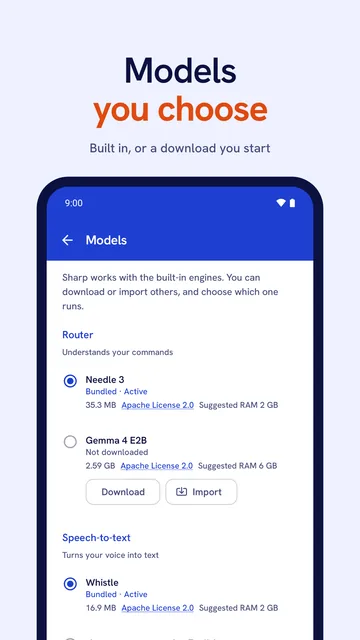
Sharp comes with two built-in models: Needle 3, which understands your commands, and Whistle, which turns your voice into text. Settings → Models lets you download others. Gemma 4 E2B, about 2.6 GB, can also answer a plain question in text, and a second speech engine is available. Each download starts only when you tap it.
Before a download, Sharp shows the size, licence, suggested memory and the host, Hugging Face or GitHub, and warns you on mobile data or a metered connection. The host receives the request like any web download. You can also import a model file you already have; Sharp checks that it is the right file before keeping it.
Gemma 4 E2B suggests 6 GB of memory, and Sharp warns that it may be slow or fail on phones with less. Its answers are written by a language model on your phone, are labelled “Answered on this phone”, can be wrong, and never trigger an action. For speech you can also pick your phone’s own recognizer, on Android 12 or later where the phone offers on-device recognition.
Permissions
Sharp asks for a permission only when a command first needs it, after a one-line reason, and doesn’t ask again unless you start it from Settings. Each permission has a route that works without it: if you say no, typing or another app takes over that step, as the table shows.
| Permission | Asked when | Without it |
|---|---|---|
| Microphone | The first time you talk | Typing works fully. |
| Contacts | The first command that names a person | Android’s contact picker opens instead. |
| Calendar | The first event | The Calendar app opens with the event filled in, and you save it there. |
| Phone | The first call | The dialer opens with the number. |
Sharp also uses the internet only for model downloads you start. It has no permission to send text messages, read your call log, use the camera or read your location. Full list in Sharp’s privacy policy
Inputs and limits
Sharp matches your words to one action and shows you what it understood, but it can misread a command, mishear a name or not understand a phrasing at all. These are the limits we know of. The card is there so you can catch a mistake before anything happens, so read it before you confirm.
- English, one command, 500 characters. Sharp understands English only, one command at a time, up to 500 characters. “Set a timer and text Mom” is two commands.
- Some phrasings aren’t understood. Some short or unusual phrasings aren’t understood, such as “standup at 9” or “louder”. Sharp then says it isn’t sure, suggests close matches and leaves your words to edit. Naming the action helps: “add standup at 9”, “volume up”.
- It can pick the wrong action. Sharp can misread a command, for example taking “alarm please” as a request to show your alarms. That is why messages, emails, calls, events and rides always wait on a card, and why the card says in plain words what it will do.
- It asks more often than it acts. Even low-risk actions often show a card when Sharp isn’t confident enough. Always confirm in Settings makes every action wait for a card.
- Values it can’t work out are left empty. If Sharp can’t tell who you mean or what time, it leaves that field empty on the card for you. Check repeat days on alarms: “every weekday” may not be filled in.
- Voice can mishear. Speech is turned into text on the phone, and it can mishear, especially names. The card shows the words it heard.
- Hand-offs depend on the other app. Only the YouTube and YouTube Music hand-offs have been tested, on an Android emulator. The other 14 routes, including WhatsApp, Telegram, Signal, Spotify, Amazon, Flipkart, Zomato, Swiggy, Uber, Ola, Rapido, Google Keep and the Play Store, have been checked on paper but not run yet. Hand-offs use each app’s public links, and an app update can change them, so check that the app opened on the right screen.
- What Android doesn’t allow. Sharp can’t switch Wi-Fi, Bluetooth or NFC on or off; it opens the panel. It has no wake word, doesn’t read your screen, and doesn’t pay, buy or book for you.
- x86_64 devices. On the few Android devices with an x86_64 processor, such as some Chromebooks, the built-in models can’t run. You need the optional Gemma 4 E2B download to type commands, and another speech engine to talk.
- Gemma 4 E2B answers. Gemma 4 E2B is an optional download of about 2.6 GB that suggests 6 GB of memory. Its text answers are written by a language model on your phone and can be wrong, and an answer never triggers an action.
- Without a permission. With no calendar permission, the Calendar app opens with the event filled in; with no phone permission, the dialer opens. A person named in an event goes in the title, and no invitation is sent.
- Pins and history. Up to 8 pins. History keeps your last 500 commands.
- Android version. Android 10 or later, on Android phones. The option to use your phone’s own speech recognizer appears only on Android 12 or later, on phones that offer on-device recognition.
Type it or say it, then check the card.