
How Keys Dialer works
Keys Dialer replaces your phone's dial pad, contacts, call history and call screens once you make it the default phone app. Calls still go over your mobile network. Everything it adds, from caller cards and notes to the call-back queue and Shield's rules, is worked out and stored on your phone.
Making Keys your phone app
Open Keys and tap Make default; Android asks you to confirm. As the default phone app, Keys shows incoming and in-call screens, and Android grants it contacts, call history, phone and notifications. Calls still go through your phone's own network. You can say Not now: search, cards, notes and reminders work without it.
Without the default role, tapping Call hands the number to your phone's own dialer. If another app later becomes the default, Keys says "Another app handles calls now"; its search, cards, notes and recents keep working, and calls you start in Keys show on the other app's call screen.
Calls from internet calling apps keep their own screens. Keys shows only calls placed through your phone's mobile network.
The caller card
When someone calls, Keys shows their card full screen: the name, number type and SIM, their local time, how many calls you've had with them in the last seven days, and the last note you wrote about them. On a locked phone the card shows full screen too; Settings shows whether Android allows full-screen calls.
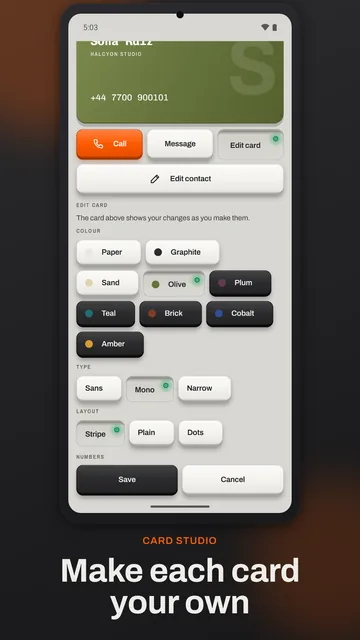
Answer and Decline are big keys, with a slide switch as well. Reply declines the call with a text that your phone sends as a normal SMS, and Remind me asks Keys to remind you in an hour. Style each card's colour, type and layout in the card studio.
Keypad search
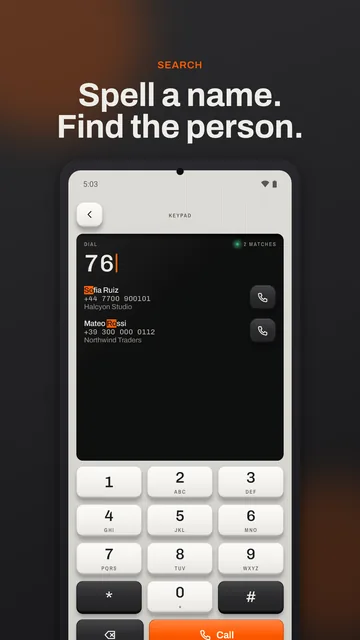
Type on the keypad and Keys spells names from the letters on the keys, so 6-2-9 finds Maya. It also matches whole numbers, any three or more digits inside a number, and the end of a long number. Matched letters and digits are highlighted, and a copied number shows as a paste chip.
Keypad search matches digits only. The Contacts tab has its own text box that filters by name, company or number.
Call-back queue and memory keys
A missed call becomes one line in the call-back queue per person, however many times they rang. Calling them back marks the line Called back, even if they don't pick up, and a new missed call from them reopens it. Clear the whole queue and Keys says All called back.
Five favourites sit on Home as memory keys M1 to M5. A key's light shows a missed call from that person. Calls that Shield silenced or blocked don't join the queue.
Notes, reminders and phone menus
After a call, write a note and pin it to their card; it shows as Last note the next time they call. Set a reminder for a time, for tomorrow, or for their next call. Reminders use Android's battery-friendly alarms, so one can arrive a little after the time you set. They need notifications switched on.
For automated lines, save the menu keys on the contact's card, for example a bank's menu, and send them during the call with one tap each.
Their local time
The card shows the time where they are and whether it's between 9:00 and 21:00 there. Keys works the time zone out from the number's country calling code when that country has one time zone. For codes that span several zones, such as +1, +7 and +61, set the zone on their card.
You can also correct a zone on any card. The 9:00 to 21:00 window has no setting in this version.
Shield
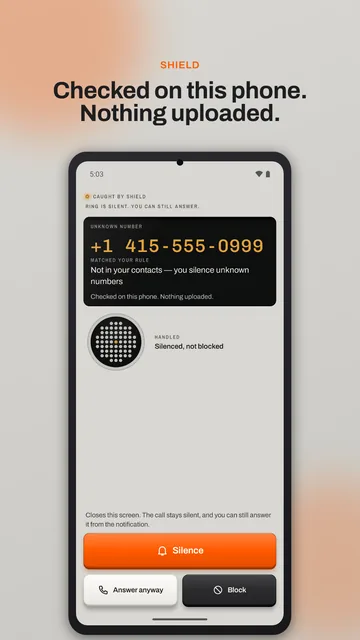
Shield checks each incoming call on your phone against your own rules, in a fixed order: favourites ring, blocked numbers are rejected, numbers you marked Not spam ring, a repeat caller within 3 minutes rings, then prefix and unknown-number rules silence the call. Anything else rings. Outgoing calls are never checked.
- A favourite rings.
- A number on your blocked list is rejected.
- A number on your Not spam list rings.
- A number Shield already checked in the last 3 minutes rings, if a rule would otherwise silence it.
- A number starting with a prefix you listed is silenced.
- A number not in your contacts, or a hidden number, is silenced.
- Anything else rings.
Shield works only while Keys is your call-screening app, a separate Android choice from the default phone app. Its rules start switched on. A silenced call still arrives without sound, and you can answer it from the notification; only numbers on your blocked list are rejected.
Inputs and limits
Keys works only with what your phone gives it: your contacts, your call history, the calling number and your own rules. It has no spam list and no internet connection. These are the cases where that matters, and the parts not yet tested on a real phone.
- Shield's rules start switched on.
When you turn Shield on, its rules for unknown numbers, repeat callers and favourites start switched on. Calls from numbers not in your contacts then ring silently until you change that. No prefix rules exist until you add one.
- Hidden numbers ring silently.
A caller with no number counts as unknown, so with the unknown-numbers rule on it is silenced, and the repeat-caller rule can't apply to it.
- Shield needs contacts access.
Shield reads your contacts at call time to know who you know. Without that access, every caller counts as unknown and favourites aren't recognised, so with the unknown-numbers rule on, every call is silenced.
- Silenced is not blocked.
A silenced call still arrives: it rings without sound and you can answer it from the notification. Only numbers on your blocked list are rejected.
- Silenced and blocked calls skip the call-back queue.
Calls Shield silenced or blocked don't join the call-back queue; check Shield's silenced list.
- Repeat callers: 3 minutes.
A number rings if Shield already checked a call from it in the last 3 minutes, and only when a silencing rule would otherwise apply.
- If Shield can't decide, the call rings.
If its rules can't be loaded within 2 seconds, or anything else fails, the call rings normally.
- Shield needs the call-screening role.
Default phone app and call-screening app are separate Android choices. Until Keys holds the second, every call rings normally.
- Keypad search matches digits only.
Digits find names by the letters on the keys, from the start of any word, and whole or partial numbers. Use the Contacts tab's text box to filter by name, company or number.
- Reminders are approximate.
Reminders use Android's battery-friendly alarms, so one can arrive a little after the time you set. They need notifications switched on.
- Local time needs a single-zone country code.
For calling codes that span several time zones, Keys can't pick one; set it on the card. Good hours are fixed at 9:00 to 21:00 their time.
- No backup.
Nothing is copied to your Google account or to a new phone. A new phone, uninstalling the app or clearing its storage starts from empty. Your contacts and call history belong to Android and are untouched.
- Calls from internet calling apps.
Keys shows calls placed through your phone's mobile network. Apps that run their own internet calls keep their own screens.
- Emergency calls.
Android hands emergency calls to the phone app that came with your phone, even when another app is the default.
- A text reply is an SMS.
Reply declines the call, and your phone sends the text as a normal SMS; your usual SMS rates apply.
- Tested only on an emulator so far.
Calls on two SIMs, Bluetooth headsets and switching audio to the speaker have only been tried on an Android emulator, not yet on a real phone.
Try Keys on your phone.