
How Zombicon passes notices from phone to phone
Zombicon phones find each other over Bluetooth Low Energy with no pairing. Each notice carries a hop limit, and phones in between pass it on until it reaches people out of your direct range. Private notices are encrypted end to end, and a notice for someone who is away waits and is sent when they come back.
Step 1Opening the app
On first launch Zombicon makes a survivor name, a sigil (a small picture drawn from your key) and your keys for you. There is no sign-up, phone number or email, and nothing to set up before you can read the wall. You can rename yourself in Settings, up to 24 characters.
Names are not identities: two survivors can share a name. Contacts and blocks follow a survivor's key, and the short code after a name tells look-alikes apart.
Step 2Finding phones
Android asks you for the Nearby devices permission, which lets an app find Bluetooth devices. On Android 11 and older it asks for location instead, because Android needs it to show Bluetooth devices there. Zombicon phones then find each other and link with no pairing dialog. Zombicon does not read, store or send your location.
With nobody in range, the status line says so: "No survivors in range yet. Notices will wait and send when someone appears."
Step 3Passing notices on
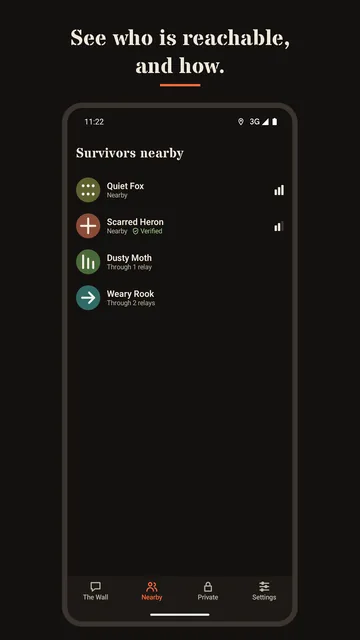
Phones relay what they hear, so a notice can pass through up to seven phones in between before it stops. Duplicates are dropped, and relays are spread out so phones don't all transmit at once. The Nearby screen shows who is in direct range and who is reached through one or more relays.
Relaying across several phones has been tested only on a simulated mesh. Real-phone testing so far covers two phones in direct range, so how far a notice gets in a real crowd is not yet measured.
Step 4Private notices
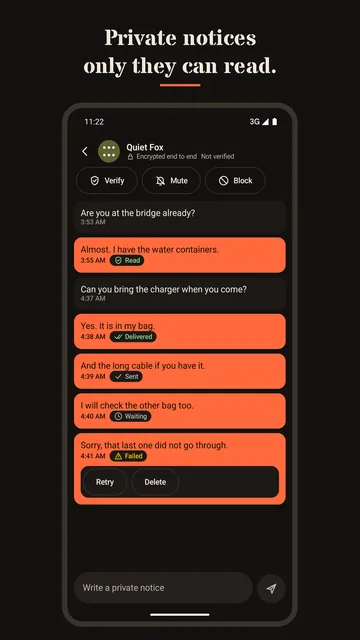
The first private notice to someone starts a key exchange with their phone, using the Noise protocol. After that, each notice is encrypted so only they can read it, not the phones that carry it. You can compare a code in person to verify a survivor, and if their key changes, the app shows a warning.
Each of your private notices shows Waiting, Sent, Delivered, Read or Failed, in words as well as colour. Delivered receipts are always sent; read receipts can be turned off in Settings. The cryptography has not been independently reviewed.
Step 5When someone is away
A private notice for someone out of range waits on your phone and keeps trying for up to 24 hours, then shows Failed with Retry. Phones in between can carry the encrypted notice for up to 12 hours and hand it on. Someone who joins late is sent the last hour of the wall.
The first private notice to someone waits until their phone is reachable, because the two phones must exchange keys first. Waiting notices and carried notices are tested on a simulated mesh, not yet on real phones.
Step 6Battery and background
Three power modes, Performance, Balanced and Power saver, trade how fast phones are found for battery; Balanced is the default. Below 15 % battery while the phone is not charging, Balanced runs as Power saver until it charges. By default the mesh runs only while Zombicon is on screen and for a few seconds after.
Stay on the mesh, off until you turn it on, keeps your phone relaying and receiving while the app is closed, with an "On the mesh" notification you can stop. Background mode has been tested on a simulated mesh, not yet on real phones. No battery figures have been measured.
Inputs and limits
Zombicon only reaches people who are running it nearby, and it cannot promise that a notice arrives. It cannot contact emergency services: do not rely on it for your safety. It is not anonymous. Range and battery have not been measured, and real-phone testing so far is one run with two phones in direct range.
- It only works when other people nearby are running Zombicon.
- A notice can pass through up to seven phones in between; past that it stops.
- Someone who arrives late is sent the last hour of the wall; older public notices are not passed on. The wall is never saved to storage: it is gone when Android closes the app or you erase everything.
- Up to 500 characters per notice. Text only: no group chats, images or voice.
- A private notice that can't be delivered keeps trying for 24 hours, then shows Failed with Retry.
- The first private notice to someone waits until their phone is reachable, because the two phones must exchange keys first.
- Phones in between may carry a notice for up to 12 hours (private, encrypted) or 1 hour (public), in memory only.
- Not anonymous: phones in range can see that a survivor with your name and public key is nearby. Your on-air ID changes about every hour and at every start; your key does not.
- The public wall is not moderated and has no report button; you can block or mute anyone.
- Zombicon cannot contact emergency services and cannot promise that a notice arrives.
- Range and battery use have not been measured. Range depends on your phones and your surroundings.
- Relaying across several phones, waiting notices and background mode are tested only on a simulated mesh; real-phone testing so far covers two phones in direct range.
- The cryptography (the Noise protocol for private notices) has not been independently reviewed.
- Android 8.0 or later, Android phones only. No iPhone version, and it does not work with bitchat. English only.
More questions? Read the Zombicon FAQ or email sonicon.software@gmail.com.