
Is it your Wi-Fi, your router or your provider?
SoniFi is an Android app that checks your connection and says in plain English where the problem is: your Wi-Fi signal, your router, your internet provider or name lookups (DNS). Each answer shows the readings behind it. SoniFi has no account, no ads and no subscription, and keeps what it learns on your phone.

Free for Android phones with Android 10 or later.
Four checks, in order
SoniFi checks in order: is the phone on Wi-Fi, does the router answer a ping, can the phone reach public internet addresses directly by IP, and do name lookups work. The first failure names the layer: the Wi-Fi, the router, past the router (likely your provider) or DNS. A router that ignores pings isn't a failure while the internet answers.
- This phonerunning
- Routerrunning
- ISPdelayedInternet
The app draws your connection as this line. In this sample the last link is delayed by slow name lookups; a link that is down is drawn dashed and called suspended.
Is the phone on Wi-Fi?
If not: Left the Wi-Fi network
Does the router answer a ping?
If not, and public addresses don't answer either: Router unreachable
Do public internet addresses answer by IP?
If not: Past the router (likely ISP)
Do name lookups work?
If not: Name lookups broken (DNS)
The labels are the ones the app shows. Some routers are set not to answer pings; on those, a provider outage can be logged as the router, so the Evidence button shows each check for you to judge. How the layers are told apart
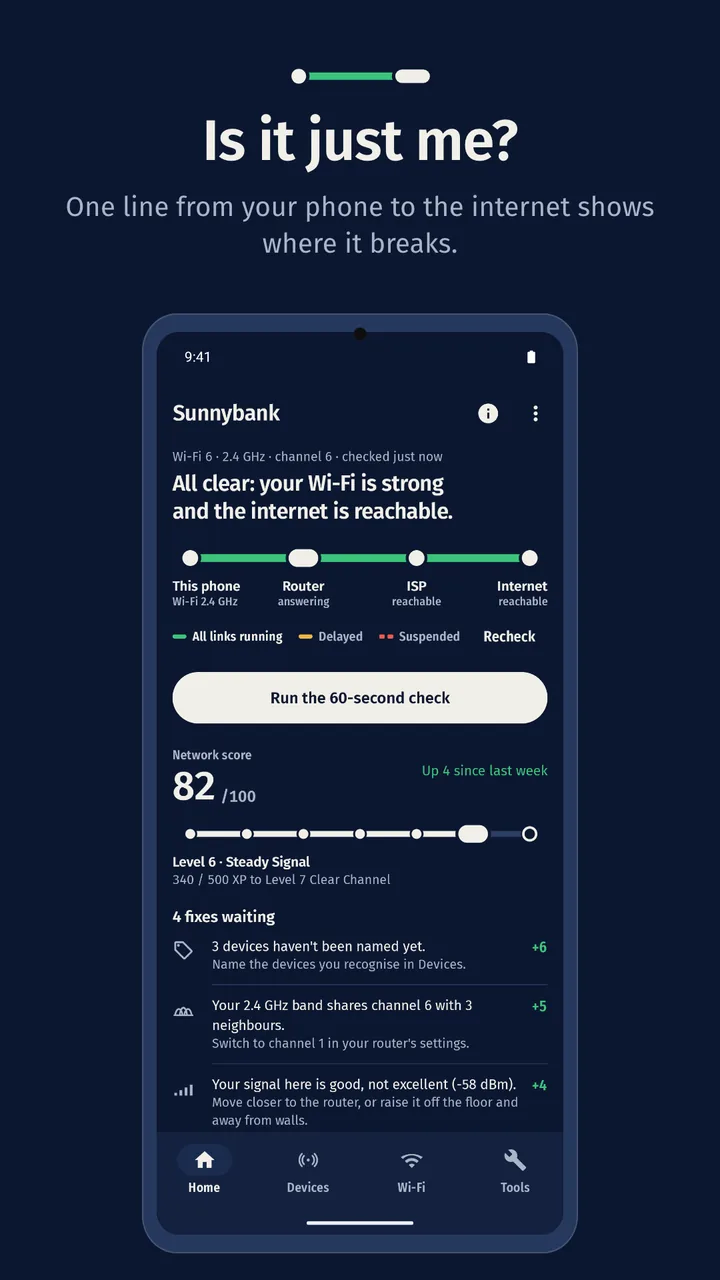
Is it just me?
Home draws your connection as one line, from this phone through your router and provider to the internet. The segment that breaks shows where the problem is, in a word as well as a colour. Below it are your network score, your level, the fixes waiting and your latest speed. The internet check runs when you open Home and again every minute while it stays on screen.
- Line This phone, Router, ISP, Internet: each link running, delayed or suspended.
- Score 0 to 100, from the checks SoniFi could make.
- Fixes waiting Each finding with its fix and the points it would add.
- Speed Your latest speed test.
Network score and levels
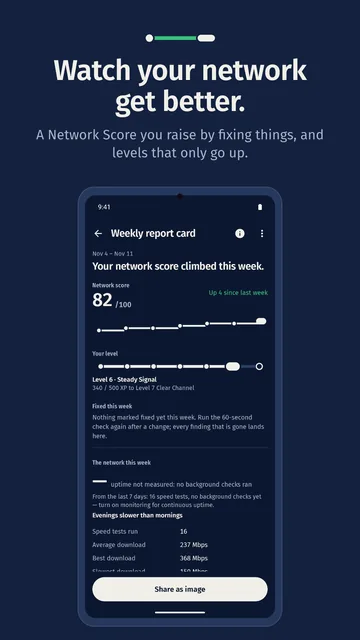
SoniFi scores your network from 0 to 100 using six checks: internet, signal, channel, stability, speed and device names. Each lost point comes with a finding and a fix you can try, and checks it can't make are left out and named. Your level records what you've done and never drops in the app.
Up to 10 points come from naming your devices, and stability needs monitoring on, so the score sums up what SoniFi can see, not your internet plan. Levels unlock nothing; every feature is there from the start.
Your level stays on this phone. Clearing SoniFi's data or uninstalling it starts you again at level 1, and it doesn't move to a new phone. How the score is built
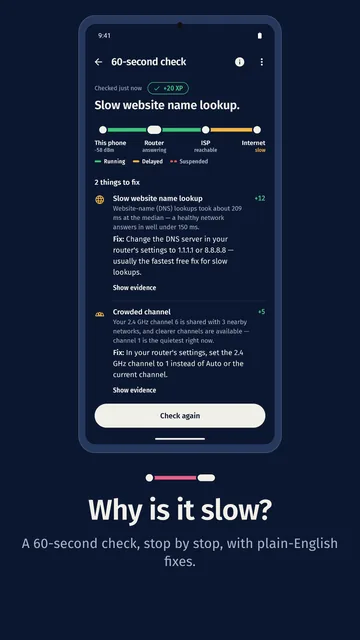
Why is it slow? The 60-second check
The 60-second check measures your signal, your channel, how your router answers, how fast names are looked up and your speed, and takes up to about a minute. It draws the result as your line, stop by stop, with one to three findings, each with its cause, the reading and a fix to try. Nothing changes for you.
- Signal Weak at −75 dBm or below.
- Router Five pings; slow when the middle reply takes over 100 ms.
- Name lookups Slow when they take over 150 ms.
- Speed Slower than usual only when earlier tests on this network give it something to compare.
A check that runs out of time or can't run is listed as not checked, not passed. The check is the "Doctor" in SoniFi's store name.
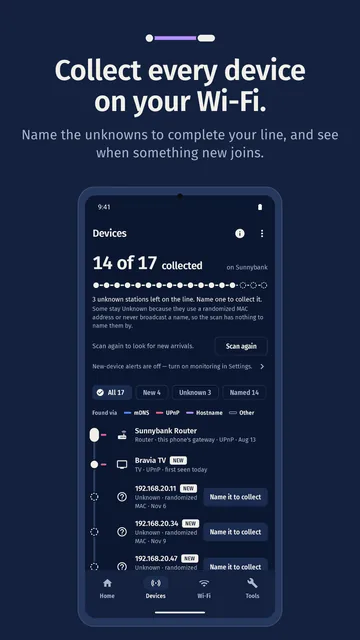
See what's on your network
SoniFi pings the addresses on your network and listens for devices that announce themselves, then names them from what they say, like a TV's name. A device counts as collected once SoniFi can name it or you do. Phones hide their hardware address, so some stay unknown until you name them; your name stays whatever they announce later.
A device that ignores pings, has none of the common ports open and announces nothing can't be listed. With monitoring on, you get a notification when a new device joins.
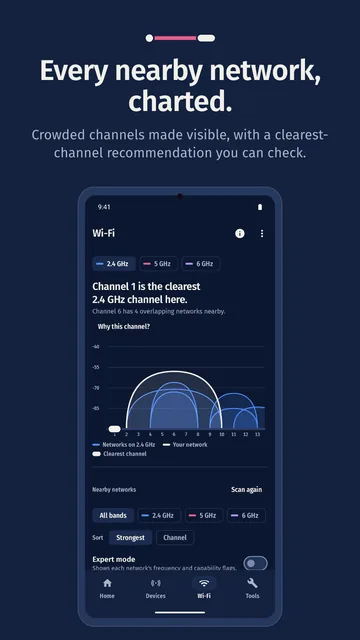
Every nearby network, charted
Nearby networks with signal, band and channel; a channel-crowding graph; the clearest channel for your band, with its reasoning; and a live signal meter for walking your rooms.
When one network name appears on more than one access point, SoniFi flags it. If their security types differ it says Possible imposter; otherwise it notes that this is usually a mesh system or repeater. It can't prove a network is fake.
Android lets apps start about four Wi-Fi scans every two minutes. When SoniFi reaches that limit it tells you when it can scan again. Why scans are limited
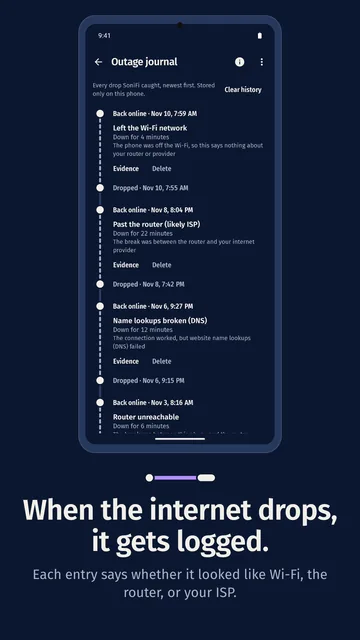
An outage journal, once you turn it on
Turn on monitoring and SoniFi checks your connection about every 15 minutes and whenever the network changes. When the internet drops, the journal records when, for how long, and where the failure looked to be: the Wi-Fi, the router, past the router (likely your provider) or name lookups.
Monitoring is off until you turn it on. An outage is logged after two failed checks in a row and closed after two good ones; on recovery a notification says how long it lasted. A weekly report card, Sunday evening unless you change it, sums up your score and level, uptime, speeds, outages and new devices. Without monitoring, it says uptime was not measured rather than showing a number.
Short drops between checks can be missed, and Android may run checks later to save battery.
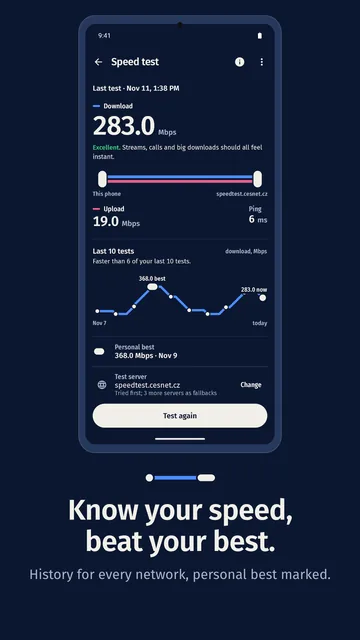
Speed test and tools
SoniFi's own speed test measures delay, download and upload against a public test server and keeps every result with the network's name. It shows how today's result compares with your last ten tests, marks your top result on that network, and can export your history as a CSV file. You can add a server closer to you.
The result is the speed between your phone and that server at that moment, so it can differ from your plan's speed and from other tests. How the speed test works
Ping and traceroute
See whether a device or site answers, and each step on the way.
Port scan
Check a device's common ports, or a range you choose, for open ones.
Services and Wake-on-LAN
Browse services devices announce on your network, and wake a computer that supports it.
Wi-Fi QR codes
Read a Wi-Fi QR code with the camera, or make one by typing your password: Android doesn't share saved passwords with apps.
Map your coverage
Import a floor plan or use a blank canvas, tap where you stand in each room, and SoniFi paints your phone's signal across the plan. It names the weakest area and, when a stronger spot is far enough away, suggests where a mesh node or extender would help. Export the map as an image.
The colours between the spots you tapped are estimated. The hint is about a node or extender; it doesn't measure where the router itself should go.
What stays on your phone
No account, no ads, no analytics in the app, no subscription. Your devices, speed history, journal, maps, score and level stay in SoniFi's storage on your phone and are left out of Android backup. The app connects only to your own network, the addresses you test, speed-test servers and a few public internet checks.
Each of those servers sees your phone's internet address, as with any connection; SoniFi sends nothing to us. Read the full privacy policy
These pages use cookieless PostHog analytics; see Website analytics.
- In the app
- No account, ads or analytics
- What it learns
- Stored on your phone
- Android backup
- Left out
- Connects to
- Your network, hosts you test, speed-test servers, internet checks
What SoniFi doesn't do
- It can't see other people's traffic or the raw radio spectrum. No Android app can.
- It doesn't watch your network around the clock. With monitoring on, it checks about every 15 minutes.
- It doesn't change settings on your phone or router. It suggests a fix; you decide.
- It can't name every device. Many show as Unknown device until you name them.
- It needs a working connection for the speed test and the internet checks.
Next time the Wi-Fi acts up, check before you guess.