
An AI answers your unknown calls
TalkToTheHand is an AI call screener for Android 10 and later. When a number that is not in your contacts calls, an AI operator picks up on speakerphone, says it is an AI and that the call is being transcribed, and takes a message. Each call comes back to you as a telegram you can act on.

Free app. Needs Android 10 or later and your own AI key, which your AI provider bills you for.

What to know before you install
- Your own callsIt can also pick up calls you make. The app's code doesn't check whether a call is coming in or going out. While screening is on, a call you dial to a number that isn't in your contacts or Trusted list goes down the same path as an unknown caller: the app turns on the speakerphone and starts the AI on your own call. This comes from the code and hasn't been tested on a phone. Take the operator off duty before you dial such a number, or add the number to your contacts or Trusted list.
- Saved contacts can still be answered. If the contact check is slow (over 1.5 seconds) or fails, or you saved the caller after the app last checked the number, the operator can answer a saved contact until the app restarts.
- Android 10 or later. The app installs on Android 8 and 9, but it can't screen calls there.
- Your own AI key. You connect OpenAI, Google Gemini, OpenRouter or your own server. Your AI provider bills you for what the calls use. Without a working key, no call is answered.
- Speakerphone. The AI hears and speaks through your phone's speaker, so people near the phone can hear the call.
- Stamps are guesses. A stamp is the AI service's reading of the call, or simple keyword rules when there is no AI summary. Those rules stamp any caller who mentions a bank, a loan or a card SCAM, even your real bank.
- Languages. Hindi works only with Google Gemini. OpenRouter and your own server work in English only and need a one-time download of about 79 MB of speech models.
- One screening app at a time. Android lets one app hold the call-screening role, so TalkToTheHand replaces any other call screener you use.
- Internet calls. The app only handles the phone calls Android passes to its call-screening app. It has no code for calls inside apps such as WhatsApp.
Every screened call comes back as a telegram
After the call, the transcript goes to your AI service, which writes a telegram: who called, why, a short summary, any callback number and a stamp. Telegrams are listed by day, with filters for Call back, Scams & spam and Handled, and a weekly tally of calls and minutes of calls handled for you.
- Call back
Someone needs you to reply.
- Routine
A real call that needs nothing from you, such as a delivery update.
- Spam
Sales calls and robocalls.
- Scam
The caller asked for codes, PINs or bank details, made threats or offered prizes.
- Unsure
Too little was said to tell.
These are the instructions the app gives the AI service. The stamp is its guess from what the caller said; there is no list of spam numbers behind it.
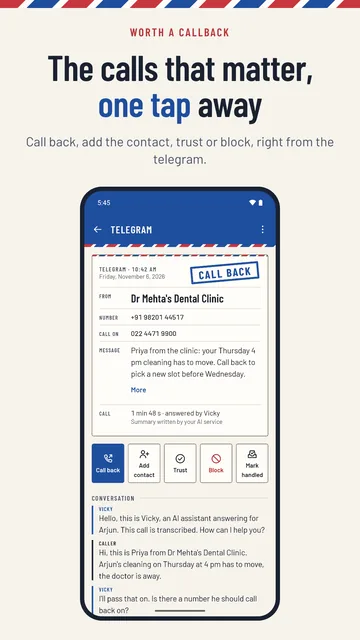
Act on a call in one tap
Each telegram has its own buttons. Call back opens your phone app with the number ready, and you press call. Add contact opens your contacts app to save the caller. Trust lets that number ring next time. Block turns it away while TalkToTheHand is your call-screening app. Mark handled files the telegram. Trust and Block can be undone.
Until the app restarts, the operator can still answer a caller saved this way.
Step in while the call is on
A notification with one short vibration tells you the operator has picked up. Open it to watch the transcript as it is written, type a line for the operator to say, take over and speak to the caller yourself, hand the call back, or hang up. You can also mute the call or switch between the speaker and the earpiece.
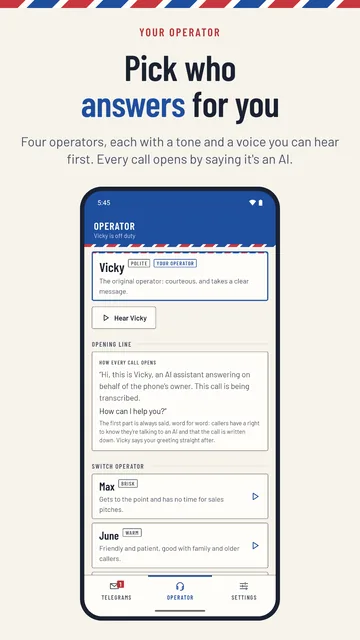
Pick who answers for you
Choose Vicky, Max, June or Bertie, each with a tone from polite to firm and a voice you can hear first. You can rename an operator, write your own greeting and add a short note about yourself. Whatever you write, every answered call opens with the fixed notice that it is an AI and the call is transcribed.
“Hi, this is Vicky, an AI assistant answering on behalf of the phone's owner. This call is being transcribed.”
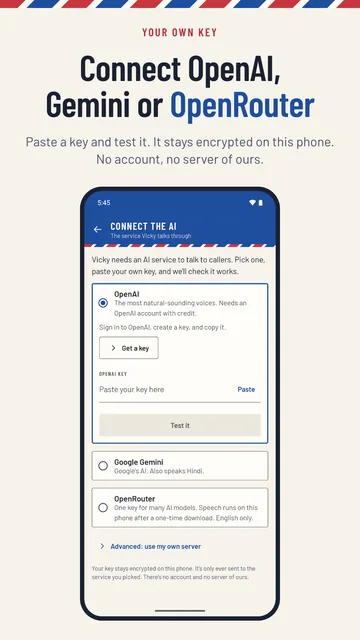
Your own AI key, no account
A guided setup connects OpenAI, Google Gemini or OpenRouter: get a key from the provider, paste it, and test it with one live request. Only a key that passes is saved, in encrypted storage on your phone. Your provider bills you for what you use. There is no Sonicon account and no Sonicon server.
You can also point the app at your own OpenAI-compatible server, under Advanced in the setup.
Where your calls go
A screened call goes between your phone and the AI service you chose, and after the call its transcript and the caller's number go there for the summary. Nothing goes to Sonicon. Telegrams stay in the app on your phone and call audio is not saved. The app has no account, ads or analytics.
The app also writes caller numbers and the start of each transcript line to Android's system log on your phone, which a bug report can include. These pages use cookieless PostHog analytics.
- Call audio or text
- To the AI service you chose
- To Sonicon
- Nothing
- Telegrams
- On your phone
- Call audio
- Not saved
- Android backup
- Off; a direct phone-to-phone transfer may still copy it
Let the operator take the next unknown call
Set up takes four short steps: what it does, your operator, your AI key and the permissions. You can skip the key and come back to it.